Skip to content
  • Home
  • Account
  • Restricted content
  • OBEX
  • Chips Tips
  • Logout
  • Shop
  • QuickBytes
Propeller OBEX
  • OBEX
  • Forum
Login
Propeller OBEX

Propeller 2

  • Configuring Visual Studio Code for Programming the P2 on Mac, Windows, and Linux
  • Breakout Board Options for P2 Edge Modules
  • Solar Panel Monitoring Demo (Intro to Using Video 3 of 3)
  • Wireless Programming with the ESP8266 WX Module
  • Brushless DC Motor Control Demo
  • Colorful Terminal Output with ANSI Escape Sequences
  • XBee RF Transparent and API Mode Demo
  • DS3231 Real Time Clock I2C Demo
  • Multiple Servo Control (up to 64) Object
  • Multiple Serial Port (8 UART – 16 Tx/Rx) Object
  • Goertzel Operation with Ultrasonic Transducers
  • Web Page Control of WS2811 LEDs Using the IoT Gateway on Raspberry Pi
  • 320×240 LCD Driver for ILI9341 Controller and XPT2046 Touch Screen
  • Digital Sample ADC to DAC + Analog Frequency to DAC
  • Using Smart Pins to Measure Frequency Output of TSL235R Light-to-Frequency Sensor
  • Ping))) Ultrasonic Distance Sensor with Graphical Debug Demo
  • Simple Analog Input
  • P2 Edge 16 MB Flash Reader and Explorer Utility
  • LED Matrix used as an I/O Test Utility
  • Arlo Conversion to P2 with the Universal Motor Controller
  • Five Buttons On One Pin
  • P2 RTC Add-on Board Demo
  • Simple Video Driver – Using Images (Intro to Using Video 2 of 3)
  • Starting Your P2 Project with a Spin2 Template
  • E-Ink Display Demo
  • MAX7219 LED Display SPI Demo
  • DHT11, DHT22, CM2302 Humidity and Temperature Sensor Object
  • NMEA GPS String Parsing
  • Floating Point Math: DEBUG and Terminal Display Example
  • LEDs – Beyond the Basics
  • Quadrature Encoder Object
  • P2 RTC Add-on with GPS Module
  • DVI/VGA Text Driver Demo
  • PCF8574 I2C LCD Demo
  • Simple Sound Engine Demo
  • 1-Wire Driver with DS18B20 Temperature Sensor Demo
  • Send Email from the Propeller 2 Using the IoT Gateway on Raspberry Pi
  • I2C Device Bus Scanner Utility
  • 32-Channel ADC Object
  • Tetris
  • Video Hardware with Character Map Demo (Intro to Using Video 1 of 3)
  • WS2811, WS2812, WS2812b, WS2813, SK6812x NeoPixel Object
View Categories
  • Home
  • Docs
  • Quick Bytes
  • Propeller 2
  • Send Email from the Propeller 2 Using the IoT Gateway on Raspberry Pi

Send Email from the Propeller 2 Using the IoT Gateway on Raspberry Pi

Reading Time: 3 min read


Note: This Quick Byte is an application of the IoT Gateway’s email feature using a CM2302 Temperature and Humidity Sensor. A Propeller 2 Live Forum on YouTube provides a detailed presentation of the entire IoT Gateway (as of February 2022). The complete, detailed, setup process of the full P2 IoT Gateway on a Raspberry Pi (email, web control, etc) is documented on the IronSheep P2 IoT Gateway GitHub. Use this Quick Byte in conjunction with those two resources for a fully informed, successful setup! 


Description #

The Propeller 2 IoT (Internet of Things) Gateway lets the P2 securely send an email through the Raspberry Pi (RPi) to one or more recipients. This Quick Byte demonstrates the email feature by using a CM2302 Temperature and Humidity Sensor.  As a P2 beginner and first-time Raspberry Pi user, the new skills I acquired were basic Linux commands to navigate directory structures and using Nano to edit files.     

The Spin2 source code for this project is available below and can be easily adapted for other uses. Applications with the P2 could include monitoring of many analog inputs or sensors in remote locations.

Benefits of the P2 RPi IoT Gateway for email:

  • Easy setup on Raspberry Pi consists of configuring Python scripts from GitHub
  • Uses external SendGrid account with API key; no password or login credentials stored on the P2 or RPi
  • Compatible with the low-cost Pi Zero for production projects using the P2 Edge 
  • Hardware connection is serial I/O between the P2 and RPi
  • Lightweight Spin2 driver communicates with the scripts on Raspberry Pi; configure the top-level object with your email addresses and content
  • Spin2 driver supports the use of formatted strings for sending numerical values
  • RPi configuration and P2 programming can also be done remotely using SSH/VNC access to Raspberry Pi with Eric Smith’s FlexProp installed for P2 programming

The setup process for this project can be done in the following sequence:

  • Raspberry Pi configuration. Loading Python scripts and running the IoT Gateway Create a SendGrid account and configure an API key. The code and documentation for this are found on IronSheep P2 IoT Gateway GitHub
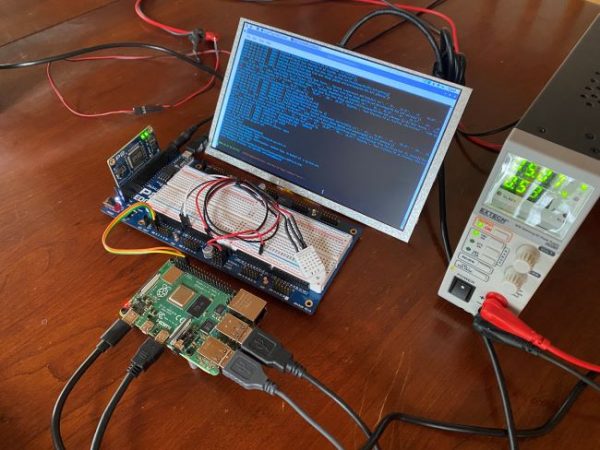
  • Propeller 2 circuit building and connection to RPi
    • P2 P0 to RPi P25 (serial Rx to Pi)
    • P2 P1 to RPi P24 (serial Tx to Pi)
    • P2 P8 to CM2302 Temperature and Humidity Sensor (also connect the sensor to Vdd and Vss)
    • Test the CM2302 as a subsystem using this Quick Byte
  • Load the example code and send an e-mail (following is using Propeller Tool; FlexProp is similar) 
    • Insert your own e-mail addresses in the Spin2 code
    • Press F11 to compile and flash
    • Press F12 to open Parallax Serial Terminal. Within Parallax Serial Terminal, press a key in the transmit pane to refresh the display and send the email

Connection between P2 Edge, CM2302 Temperature and Humidity Sensor, and Raspberry Pi:
Insert your email addresses in the highlighted lines in the sample code DAT section:

DAT { our email and hardware ID strings }

p2HardwareID    byte    "P2 Edge - GWDemo1",0

emailTo         byte    "kgracey@parallax.com",0
emailFrom       byte    "kgracey@parallax.com",0
emailSubj       byte    "Message from the Propeller 2",0
emailBody       byte    0[1024]     
                       ' 1K bytes to format the email text

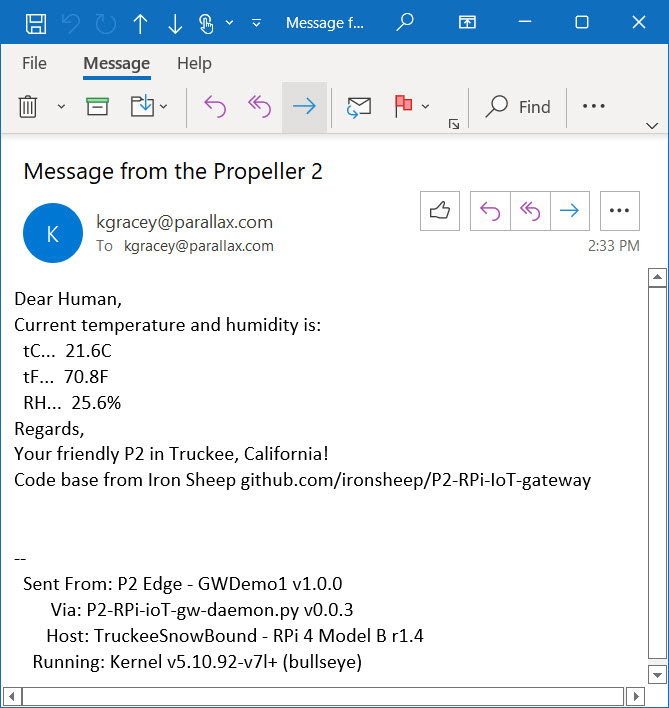
E-mail sample:
Parts Used #
  • P2 Edge Module
  • P2 Edge Breadboard
  • CM2302 Temperature and Humidity Sensor
Source Code #
  • CM2302 E-mail Send Demo Using P2 RPi IoT Gateway (Spin2 archive)
Programming Language #
  • Spin 2
  • PASM2
Tools and Operating System #
  • Propeller Tool for Windows
  • FlexProp for Windows, Mac and Linux
Additional Resources #
  • Propeller 2 Spin Documentation
  • Propeller 2 Live Forum Video: IoT Gateway for the P2 with Raspberry Pi
Document Author #
  • Ken Gracey
Source Code Author #
  • Stephen Moraco
  • Ken Gracey
  • Jon McPhalen
Was this useful ?

Share This Article :

  • Facebook
  • X
  • LinkedIn
Still stuck? How can we help?

Still stuck? How can we help?

Updated on September 29, 2026
1-Wire Driver with DS18B20 Temperature Sensor DemoI2C Device Bus Scanner Utility
Table of Contents
  • Description
  • Parts Used
  • Source Code
  • Programming Language
  • Tools and Operating System
  • Additional Resources
  • Document Author
  • Source Code Author

Copyright © 2026 - Parallax Inc.
599 Menlo Drive | Rocklin, CA 95765 | USA