Skip to content
  • Home
  • Account
  • Restricted content
  • OBEX
  • Chips Tips
  • Logout
  • Shop
  • QuickBytes
Propeller OBEX
  • OBEX
  • Forum
Login
Propeller OBEX

Propeller 2

  • Configuring Visual Studio Code for Programming the P2 on Mac, Windows, and Linux
  • Breakout Board Options for P2 Edge Modules
  • Solar Panel Monitoring Demo (Intro to Using Video 3 of 3)
  • Wireless Programming with the ESP8266 WX Module
  • Brushless DC Motor Control Demo
  • Colorful Terminal Output with ANSI Escape Sequences
  • XBee RF Transparent and API Mode Demo
  • DS3231 Real Time Clock I2C Demo
  • Multiple Servo Control (up to 64) Object
  • Multiple Serial Port (8 UART – 16 Tx/Rx) Object
  • Goertzel Operation with Ultrasonic Transducers
  • Web Page Control of WS2811 LEDs Using the IoT Gateway on Raspberry Pi
  • 320×240 LCD Driver for ILI9341 Controller and XPT2046 Touch Screen
  • Digital Sample ADC to DAC + Analog Frequency to DAC
  • Using Smart Pins to Measure Frequency Output of TSL235R Light-to-Frequency Sensor
  • Ping))) Ultrasonic Distance Sensor with Graphical Debug Demo
  • Simple Analog Input
  • P2 Edge 16 MB Flash Reader and Explorer Utility
  • LED Matrix used as an I/O Test Utility
  • Arlo Conversion to P2 with the Universal Motor Controller
  • Five Buttons On One Pin
  • P2 RTC Add-on Board Demo
  • Simple Video Driver – Using Images (Intro to Using Video 2 of 3)
  • Starting Your P2 Project with a Spin2 Template
  • E-Ink Display Demo
  • MAX7219 LED Display SPI Demo
  • DHT11, DHT22, CM2302 Humidity and Temperature Sensor Object
  • NMEA GPS String Parsing
  • Floating Point Math: DEBUG and Terminal Display Example
  • LEDs – Beyond the Basics
  • Quadrature Encoder Object
  • P2 RTC Add-on with GPS Module
  • DVI/VGA Text Driver Demo
  • PCF8574 I2C LCD Demo
  • Simple Sound Engine Demo
  • 1-Wire Driver with DS18B20 Temperature Sensor Demo
  • Send Email from the Propeller 2 Using the IoT Gateway on Raspberry Pi
  • I2C Device Bus Scanner Utility
  • 32-Channel ADC Object
  • Tetris
  • Video Hardware with Character Map Demo (Intro to Using Video 1 of 3)
  • WS2811, WS2812, WS2812b, WS2813, SK6812x NeoPixel Object
View Categories
  • Home
  • Docs
  • Quick Bytes
  • Propeller 2
  • Quadrature Encoder Object

Quadrature Encoder Object

Reading Time: 1 min read

Description #

These three source code examples interface a quadrature encoder clock, data and button signals to the Propeller 2. The first two versions are useful for seeing the internals of the encoder signals, but the third version is a demo with its own encoder object. 

  • Rotary_Encoder_Demo1_Archive.zip – read a quadrature encoder with Spin2 and PASM
  • Rotary_Encoder_Demo2_Archive.zip – read a quadrature encoder with Spin2 and a more advanced PASM that keeps track of prior positions
  • Rotary_Encoder_Demo3_Archive.zip – puts the encoder into its own object

The encoder object and terminal (which may be Parallax Serial Terminal or ANSI-Compliant) are started in this method:

pub setup()
    
      enc.start(ENC_A, ENC_B, ENC_BTN, enc.DETENT, 0, LO, HI)       ' start encoder
    
      term.tstart(BR_TERM)                                          ' start terminal serial

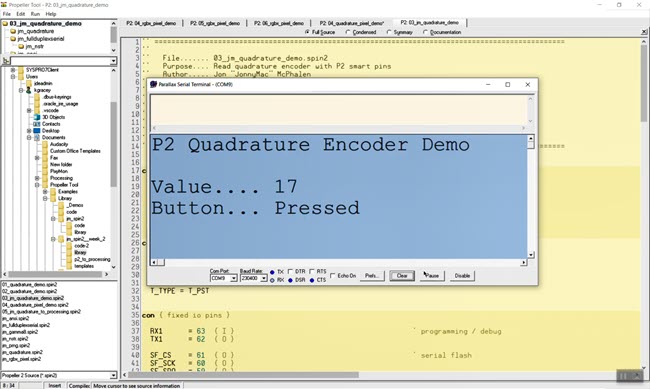
The object used in the third example has a complete encoder configuration for the low and high range and button states. The output from Parallax Serial Terminal looks like this:

Parts Used #
  • P2 Edge Module
  • P2 Edge Breadboard
  • Rotary Encoder Module with 15×16.5 mm with Knob
Source Code #
  • 01_quadrature_demo-Archive.zip
  • 02_quadrature_demo-Archive.zip
  • 03_jm_quadrature_demo-Archive.zip
  • Rotary_Encoder_Demo_Archive.zip
Programming Language #
  • Spin 2
  • PASM
Tools and Operating System #
  • PNut_v35c.exe for Windows.
Additional Resources #
  • Propeller 2 Spin Documentation
  • Propeller 2 Live Forum Video: Quadrature Encoder
Document Author #
  • Ken Gracey
Source Code Author #
  • Jon McPhalen
Was this useful ?

Share This Article :

  • Facebook
  • X
  • LinkedIn
Still stuck? How can we help?

Still stuck? How can we help?

Updated on September 29, 2026
LEDs – Beyond the BasicsP2 RTC Add-on with GPS Module
Table of Contents
  • Description
  • Parts Used
  • Source Code
  • Programming Language
  • Tools and Operating System
  • Additional Resources
  • Document Author
  • Source Code Author

Copyright © 2026 - Parallax Inc.
599 Menlo Drive | Rocklin, CA 95765 | USA